SlicerX is a slicer for FFF 3D printers. You give it a model and settings and it gives back G-code and a preview. I'm writing it in Rust, on top of a 3D modeling engine I started in 2021. The app and the repository around it started in September 2026. It is free, open source under Apache-2.0, and still pre-alpha.
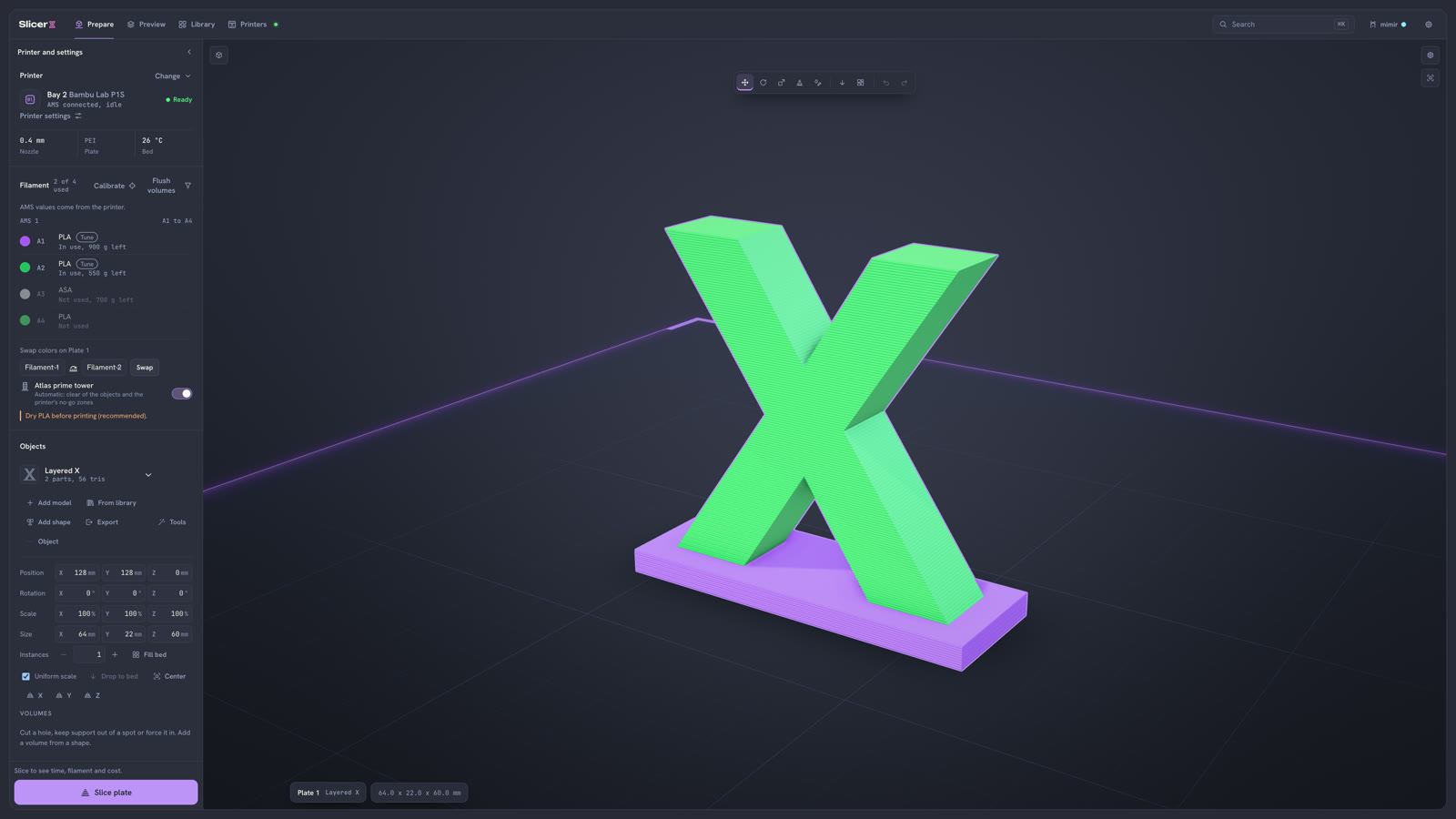
I slice quite a bit for N3D Melbourne, mostly in OrcaSlicer and Bambu Studio. They are good apps, and they are hard to drive from other software. If I want a script, a web page or an agent to slice a file, I either call a command line that was added to a desktop app or work inside a C++ codebase that has been growing since Slic3r. I wanted the engine to be a library first and an app second.
Where the engine came from
In 2021 I started writing my own 3D modeling engine, with sketching, extrudes and push and pull on faces. I finished it, and then it sat for five years. At work I use professional CAD kernels that are well known in the industry, and a lot of the software built on them is old MFC code. I knew there were more modern and more powerful tools to build with now. Hundreds of thousands of lines of that kind of code could be tens of thousands, and much easier to manage. That is what got me started.
The engine is all handwritten, and it has a grant application pending. The rest of the slicer is AI-assisted. I'm excited by how many builders and developers are working with AI now, so the big thing for me in SlicerX was the MCP server: something people can build on without paying for it, and learn from while they build. I also wanted to make a modern slicer. The popular open source slicers descend from one another (OrcaSlicer from Bambu Studio, Bambu Studio from PrusaSlicer, PrusaSlicer from Slic3r), and SlicerX has no code from any of them.
It does use the setting names those slicers share, so existing printer and filament profiles carry over. Because all of the code is SlicerX's own, the base kit is Apache-2.0, and anyone can build it into their own product, open or closed, as long as they keep a "Made with SlicerX" credit.
Start with your AI
The easiest way to build on SlicerX is to install the MCP server in whichever AI client you already use (Claude, ChatGPT, Cursor or another) and tell it what you want. The server gives the model mimir's tools along with the install, embedding and theming guides and the settings reference, so it can read how SlicerX fits together before it writes any code for you.
$ pnpm install && pnpm --filter @slicerx/mcp build$ claude mcp add slicerx -- node "$PWD/packages/mcp/dist/cli.js" --allow-dir ~/prints> I want to integrate this slicer into my print farm app> I want to slice some files in the cloud> I want to make my own Fusion 360For the first one, the model reads the embedding guide, picks the surface that fits your app and can build a theme in your brand colors with a contrast check. For the third, the server has the modeling engine's tools (sketch and extrude, revolve, push and pull, booleans, fillet and chamfer, on the bed or on a face you pick) and a guide to building a CAD app on the engine with a worked example. The cloud tools are there as well, and they work once the server is pointed at a cloud backend. The hosted SlicerX cloud is not live yet, and the server goes on npm with the rest of the source at launch.
Ways in without an AI
Underneath, the same Rust code builds to native code and to WebAssembly, and each surface is a thin layer over it. There is the sx command line, the sx-core crate (which has no file system, network or async runtime inside), a C library for anything that can call C (Swift, C# and Go included), a WebAssembly worker pool for slicing in the browser, and the plate viewport and settings panel as React components or custom elements. If you are building your own tool you only take the part you need. A print farm script can call the CLI, a web store can slice in the visitor's browser, and a desktop app can link the C library.
The simplest way in is a JSON request. You describe the plate, the settings and the outputs you want, and you get G-code, a preview buffer and a result file back. The request's JSON Schema comes from the tool itself, so any language can build one.
{ "schemaVersion": 1, "plate": { "objects": [{ "id": "a", "mesh": "x-mark" }] }, "config": { "layer_height": 0.2, "wall_loops": 3 }, "options": { "emitGcode": true, "emitPreview": true }, "meshes": { "x-mark": "x-mark.stl" }}$ sx slice --request request.json --out-dir out/# the schema for that file: sx schema requestSpeed and memory
The benchmark plate I use while working is 508 layers. Natively it slices in 17.1 ms (the median of 15 runs on an M3 Pro), and the WebAssembly build in Chrome does it in 55.3 ms with G-code identical to the native build. Every benchmark run also checks that the G-code is valid and that a sharded run and an unsharded run produce the same bytes.
Against the other slicers I run each one from its own command line with the same Bambu Lab presets and take the median of five rounds. The heaviest model in the set is a mesh of 1.2 million triangles:
slicer wall time peak memorySlicerX (aegis) 2.68 s 369 MBBambu Studio 3.49 s 638 MBOrcaSlicer 4.00 s 933 MBPrusaSlicer 4.34 s 1032 MBMemory is where the gap is biggest, and it is why the engine is light enough to run on a computer from twenty years ago. SlicerX is not ahead on every model yet. Tree supports are the slowest part right now, and I have set speed work aside for a while to finish the features for the first release.
Named features
A few features got their own names, because I wanted to point at them in the app and in conversations with mimir, the assistant. Each one has a plain description next to its name in the app.
aegis: variable-width walls
aegis is my wall generator and the default. It is in the same family as Arachne, which varies line widths so thin and uneven walls fill properly. aegis keeps the outer lines at their set width and lets the middle one or two take up whatever thickness is left over. It follows the Athena method from preFlight, which is credited in the project's NOTICE file. On an eccentric ring with three walls, the line width along the walls changes 185 times with aegis and 1,669 times with Arachne, and widths stay between 0.42 and 0.55 mm where Arachne's range from 0.37 to 0.65 mm.
sleipnir: adaptive layer height
sleipnir changes the layer height as the part goes up, with thinner layers on curves and slopes where the steps would show. It sits in the layer height picker after the fixed heights.
atlas: the prime tower
atlas is the prime tower for multi-material prints. It works out where the tower goes and how big it needs to be, so there is nothing to place by hand.
norn: edit from Preview
norn lets you change things from the Preview screen. Click a path, change a setting or move a layer mark, and the old and new toolpaths show together before you keep the change.
mimir and the MCP server
mimir is the assistant built into SlicerX. It can plan a multi-step job: pick the printers that have the right filament loaded, arrange the plates, adjust settings for a material, slice and queue. It cites the knowledge base for every setting it changes. You can connect it to your ChatGPT account, to your own OpenAI or Anthropic key, or to a local model, which costs nothing to run.
The MCP server gives other AI clients the same tools and the same rules. Reading is always allowed: settings, profiles, the knowledge base, printer status and camera snapshots. Everything else follows a policy the user writes, with Allow, Ask first or Off for each class of action. Heating, moving and queueing default to Ask first, and spending money defaults to Off.
An approval covers one action on one target with the exact parameters shown. It is signed, works once and expires after five minutes, and the printer connector checks it before it sends anything to the printer. An agent can queue a print and ask for it to start, but only a person can approve the start, with a tap in the app or on their phone. Every call and decision goes into an action log.
The part I am working on now is a print watch. A detector on your own computer looks at the printer camera during a print, and three suspicious frames out of five send a push notification with no image in it. Auto-pause is off by default. You can also ask mimir how the print is going, and it takes a fresh frame and tells you what it sees. It works in tests and has not been proven on real printers yet.
Files and the library
SlicerX saves projects as .sx3mf. An .sx3mf is a normal 3MF project, laid out the way Bambu Studio and OrcaSlicer lay theirs out, with a few extra metadata entries that name the library model, its creator and the account that exported it. The geometry is never changed, and any 3MF reader opens the file once it is renamed to .3mf. An earlier plan had encrypted, fingerprinted creator files. I dropped that in favor of an open format and a moderated library.
The library is the next big piece. It will be free, and anyone will be able to upload. Every upload gets scanned and waits in a queue, and at first I approve each one by hand. Creator pages link out to the creator's own Patreon, website or MakerWorld page, and people will be able to slice library models in the cloud, which is also how the phone apps will slice.
Where it stands
The engine, the CLI, the C library, the WebAssembly build, the MCP server, a Claude Code plugin and the browser app all work today. Printer connectors for Bambu Lab, Klipper, Prusa, OctoPrint and others are written and being tested against real hardware, and the desktop app runs on macOS with Windows and Linux builds set up but not yet proven. There are no prices anywhere in it. It is funded by donations, and the source goes on GitHub when it launches. If you want to help, you can buy me a coffee or sponsor me on GitHub. The landing page is at slicerx.app.